A DLS Logo is the logo that your club displays on the team screen, scoreboard and match ball in Dream League Soccer. A logo is not created in the game but it’s uploaded via a logo URL, which is a direct link to an image (size 512×512) on the internet. A DLS Logo is the logo your club displays on the team screen, scoreboard and match ball in Dream League Soccer. A logo is not designed in the game, but rather is added via a logo URL, which is a direct link to an image that is hosted online.
Real Madrid

FC Barcelona
Paris Saint-Germain (PSG)
Man united
Man City
AC Milan

Arsenal
Chelsea
Liverpool
Portugal
Bangladesh
France
Ghana
Nigeria
Senegal
If you are looking for any other club dls logo that is not here, please check below button.
All DLS logos on this page are 512×512 PNG images and have a direct URL which can be pasted directly into Dream League Soccer. Copy the badge you desire, then follow the four import steps below, and you’ll have your badge in your kit in about 30 seconds.
All images are stored on our own server. That’s more than it sounds like. The majority of the lists of logos refer to free image hosts, and as soon as those accounts are deleted or the host denies requests from outside, all the links on the page go dead. Our don’t go away because others don’t control them.
All links were tested again on 6th September 2026 on iPhone 15 Pro Max with iOS 26.5.2.
Copy a DLS logo URL
Click on “Copy URL”, then follow the import steps below. All the badges on this page are 512×512 PNG and transparent.
How to import a DLS Logo
Requires approximately 30 seconds after having a URL. Here is the step by step tutorial with Screenshots.
Step 1: Play Open Dream League Soccer and tap on My Club. This is the screen you will see after loading the game.
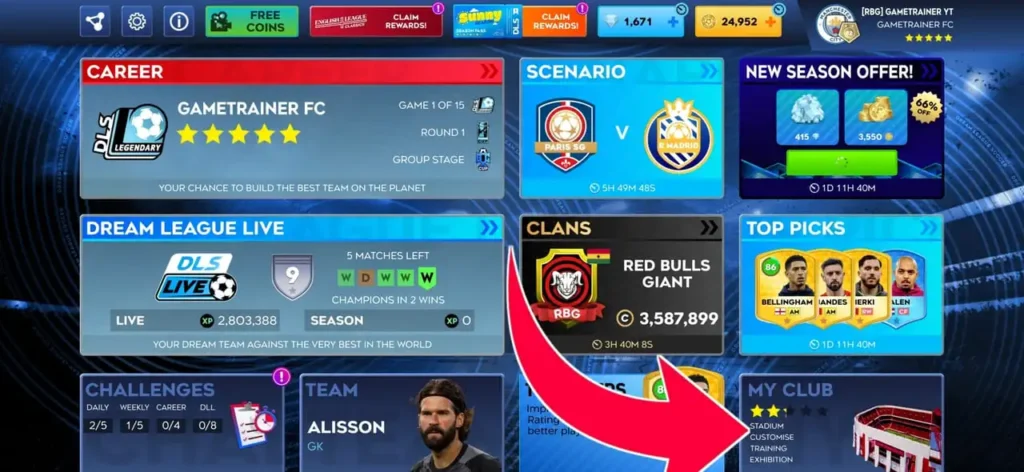
Step 2: Tap Customise. It is located in the club menu, along with your squad and stadium selections.
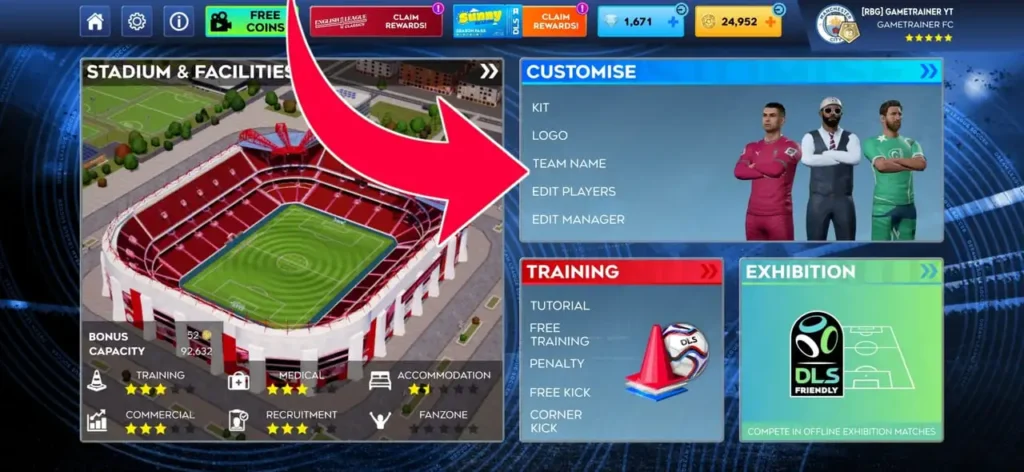
Step 3: Choose Edit Logo. It will be located on the left side of the customize panel.
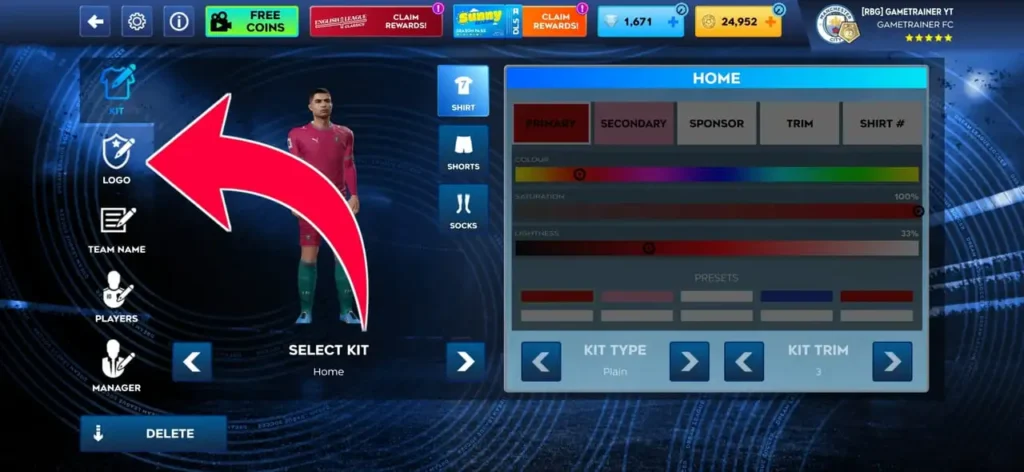
Step 4: Tap Customize Logo and then paste your URL. Hold down the field and select Paste.
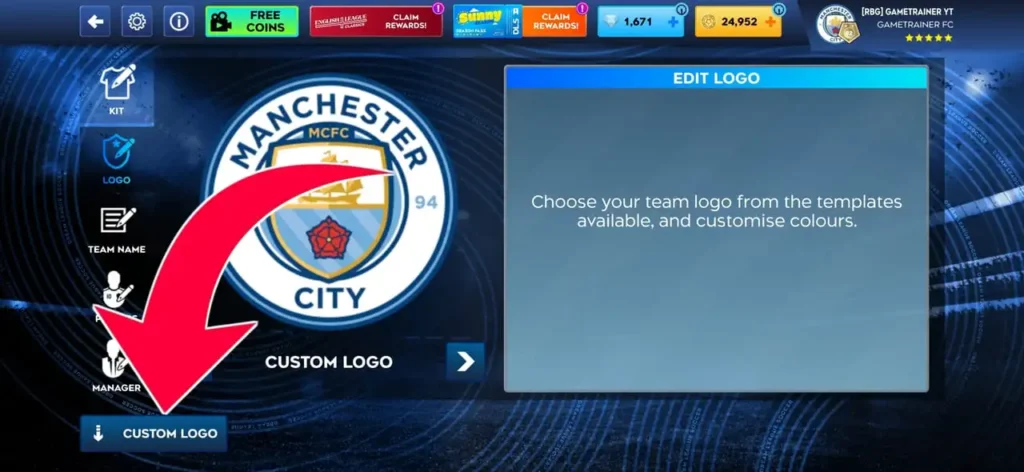
Step 5: Paste your link in search box, then confirm it.
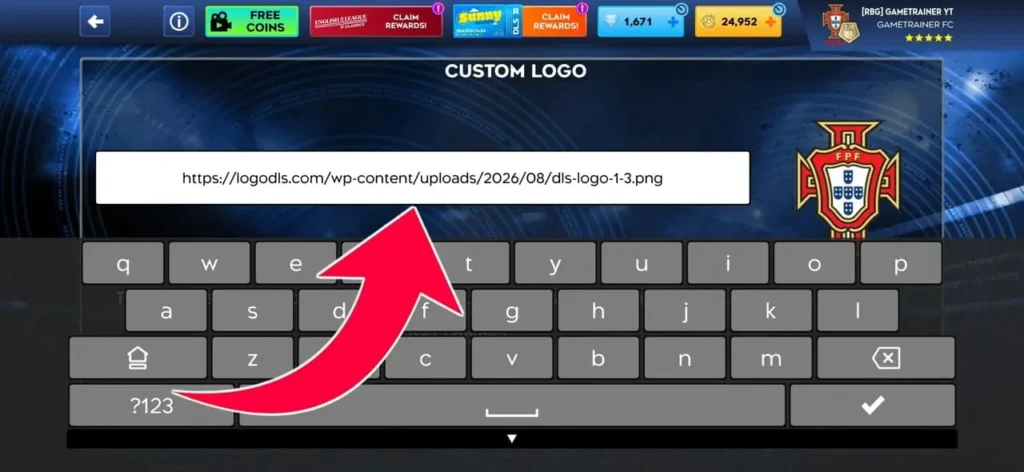
Step 6: Hit Confirm. You should see “Image successfully downloaded” and the badge will be displayed on your kit immediately.
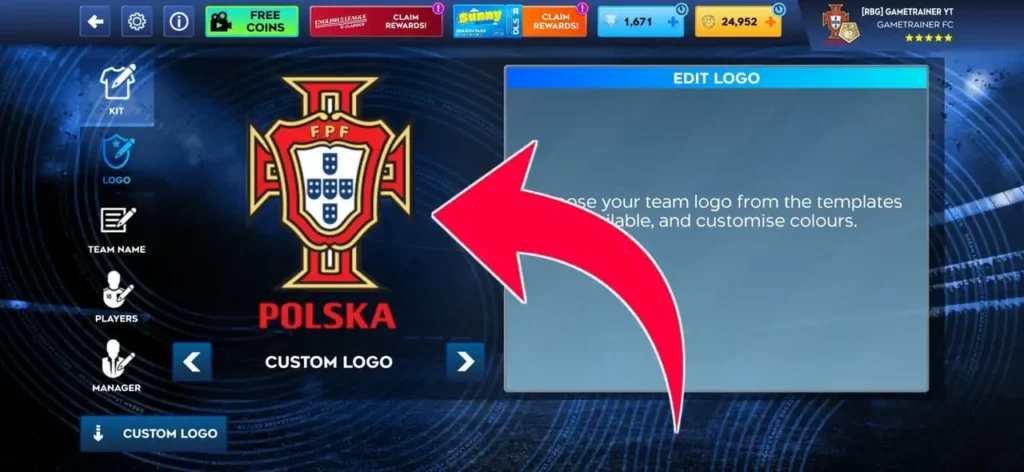
Note: The paste option is displayed as soon as you long-press the text field on Android. If the paste menu is not appearing, press the field once to get the cursor to the front, and then long-press. Safari may sometimes copy the URL of the page rather than the URL of the image, so please do not copy from a Safari tab, but use the Copy buttons on this page.
What size is a DLS logo?
512 x 512 pixels, PNG, transparent background, less than 1MB. There is no other method which is consistently effective.
| Requirement | Detail |
|---|---|
| Width | 512 pixels exactly |
| Height | 512 pixels exactly |
| Aspect ratio | 1:1 square |
| File type | PNG preferred, JPG accepted |
| Background | Transparent |
| File size | Under 1 MB |
| Hosting | Direct image URL ending in .png or .jpg |
You can’t resize it because your badge is used everywhere. It is displayed on your shirt, the team menu, in the match HUD while playing and in the league table. One 512×512 image is detailed enough to remain sharp when scaled up by the game for the kit, and small enough to load quickly over a poor connection. Give it something smaller and it’ll stretch, hence blurry badges. Give it something bigger and it generally won’t open the file.
PNG or JPG?
PNG, almost always. Two reasons.
The number one issue is transparency. A JPG does not allow for a transparent background, so your badge will come with a rectangle of white or grey background. That’s a sticker that was slapped on the shirt on a red Liverpool kit.
The second is thin detail. Football crests have a lot of fine lines, which get smeared by the JPG compression. The legs of Tottenham’s cockerel are thin. Juventus has stripes of hairline running through the J while Barcelona has small FCB lettering on their crest. Everything is preserved as PNG and becomes jello as JPG.
Two format traps to be aware of. The indexed PNGs are saved with a smaller colour palette, typically done by an export tool attempting to minimise file size. Banding of gradients will be visible as stripes, and soft edges will be rough. Save as a full colour PNG with transparency. The other one is the white halo.
When someone has removed the background from a JPG and converted it to a PNG, the anti-aliased pixels around the crest retain a faint outline of the original white background. It’s not visible on a light screen but is clearly visible on a dark kit. If you see a slight outline that you didn’t create, this is what happened, and you need a cleaner source file.
Why your DLS logo isn’t working
Complete this list in the order shown. The first two are for the most common failures.
The link is not pointing to an image, but to a webpage. By a wide margin this is the number one cause. A working link is the link that is in the file itself, such as [https://logodls.com/wp-content/uploads/2026/08/real-madrid-dls-logo-512×512.png]. If it is broken, it points to a page that just shows the image. The following is an example of an Imgur page, which is an album page: imgur.com/a/K3nZq. Only imgur.com/K3nZq.png is the actual file. Always the extension at the end is the tell. If your link doesn’t contain .png or .jpg, then there’s nothing to download. The actual address is found by long pressing the image and selecting Copy image address, not Copy link address.
This is a common mistake, even for some websites that have lists of logos. Players copy and paste the album links under each badge and get nothing because several popular DLS logo pages have album links under each badge.
The image isn’t 512×512. If it is too small, it will import blurry. If it’s too big, it will not import. If in doubt, pass it through the checker above.
The link is not secure (http instead of https). Older links occasionally do. Try again with a different prefix.
The URL redirects. Shortened links from bit.ly, tinyurl and others redirect the game to a redirect rather than a file. Click on the short link in the browser and then copy the address you are taken to.
Hotlinking is not allowed by the host. Some image hosts will return a 403 error if the request is made from outside their site, and Cloudflare-fronted hosts are no exception. It looks fine in the browser but doesn’t work in the game. You can’t do anything about it. Rehost the image to a location where it is allowed.
The image has been removed. Old uploads are deleted by free hosts and accounts are deleted. Last season, the URL might have been a valid one, but this season it may be a different one. The most common failure of a link from an old forum post or an old logo list is this.
Links to Google Drive, Dropbox and Facebook. All three are wrapped in scripts and login checks in a viewer page. The share link you receive is a page address, not a file address, which is why the game is unable to read it. Sometimes Dropbox links must be used to serve the raw file, but it is easily broken, without warning. Use a proper image host, instead.
File is too large. The 4 MB PNG will time out or be rejected. Compress or export at a reduced bit depth.
The old logo is still showing. Imported successfully but no changes were made to the screen. This is a cached version of the game. Go back to the main menu and go back again or Close the app and reopen it. If it still doesn’t work, import another badge, confirm it, and then import the badge you want.
Your network or ISP is blocking the host. Some countries block image hosts at network level. Imgur in particular is unreachable on some mobile networks in South and Southeast Asia. The sign is specific: the same URL works on Wi-Fi but not on mobile data, or it works for your friend but not for you. Switch networks and try again. Our logos are on our own server, not Imgur, so if a blocked host is your problem, copying the URL from this page usually fixes it.
Will My DLS Logo Stay After an Update or Reinstall?
When you import, the confirmation message is Image successfully downloaded, and that’s a pretty informative message. The game is downloading and saving the file instead of loading the URL again every time the game runs. That translates to real-world implications.
Playing offline
The DLS Logo is still displayed. After importing a logo, it will appear as it should, with no relation whatsoever, as the logo file is already on your phone. Internet is only required for the import.
Your logo remains after the game update
Customisations are not updated with the game but stored in your save file, therefore, when the game is updated, your badge remains the same.
Once uninstalled and reinstalled DLS Logo is missing
This has been tested with Redmi Note 9 Pro. Remove the game, reinstall it and sign in again and the badge is not restored. Your club and progress will be restored when you return your account. The image doesn’t, as it was never on the phone.
This is not possible with any setting. A cloud save is not a save of your team, but of the picture the game downloaded onto your device, so the only real protection is to have the URL written down somewhere.
Changing devices
Your DLS logo isn’t going with you. This one is a test we conducted ourselves. When signing in with the same account on a different phone (Android), a PSG badge wasn’t displayed. Your club, squad and progress will follow your account. The image doesn’t, because it was downloaded onto the first device and never left it.
This is probably the case with any type of device change, not just iPhone to Android, as the file is stored locally in either case. We’ve confirmed the cross-platform switch, which is the case.
Regardless of the results of those tests, here’s the takeaway. Write down your URLs. Open the notes app, create a list of all the logo and kit links for your team and save. Re-importing from a saved list will only take a minute. It takes an evening to hunt down a badge that you found 8 months ago, and there’s a good chance that the link has been broken by that time.
Where to host a custom DLS logo
A note on Imgur. It’s the host that all DLS guides recommend and still works for many, but not as much as in the past. It is not always reliable, either because it is difficult to handle the hotlinks, or because they are blocked at the network level in some countries.
That’s why we uploaded all our images to our server where we can easily control our DLS LOGOS.
Round or square? How the circle crop works
With Dream League Soccer, all uploaded images are cropped to a circle. It doesn’t matter what shape your file is. The circle is approaching.
A round badge with a transparent background passes through as designed. A square with corners is a square that has its corners cut off. Most club crests are okay, as the significant part is in the middle. It turns into an issue when the design extends to the sides. If shields have pointed bottoms, they lose the point. The ends of banners are lost. Text is lost if it is on the bottom edge, and has a year or a motto.
If you are creating your own, make sure it is centered and has a minimum of 50 pixels of white space around it. All the round logos on this page already adhere to that rule.
But there’s the part you don’t tell yourself about. Your badge doesn’t only appear big on your shirt. It appears in the match in the small form, next to the score, and at this scale it is a whole new ball game.
The thin outlines fade away first. A one-pixel border is crisp at 512×512, and is completely invisible at a smaller size. Similarly, small text around the rim is rendered as a grey smudge, which is why any club name or founding year around the rim is rendered as a grey smudge. If your badge is predominantly the same colour as your kit then it is not read as a badge. The navy crest on a navy shirt is there, but it’s hard to see.
How to make your own DLS logo
No design experience required and no cost, just 10 minutes.
Photopea is free, runs in your browser and is similar to Photoshop. Best choice for controlling layers and transparency. The easy one is Canva, where you can replace the logo’s text and colours. Figma is for clean, flat, vector badges with sharp edges.
The procedure is the same for both. Use the canvas size of 512 x 512. Design with the circle crop in mind – keep all that is important clear of the edge. Choose a shape that will not be destroyed by cropping, such as circles and rounded shields, but not tall banners. Next export as an image with transparency enabled (as a PNG). In Photopea, it’s File, Export as, PNG, and with the background layer hidden. You need to have the transparent background option when exporting in Canva.
Then upload it to somewhere, get the direct link and paste it into the game. The hosting section includes information on what hosts to trust and how to get the “right” kind of link from each.
A tip from observing the bad way. Don’t write your team’s name around the edge of the text. It’s always pretty on the canvas, and it’s always mushy in the match HUD. At this scale, this thing is primarily seen in a strong shape and two colours, which outperform a detailed crest.
Check out DLS logos by league.
Top Asian leagues AFC Champions League · AFC Cup · AFC Champions League Qualifier · AFC Cup Qualifier · AFC Champions League Group Stage
The World Cup teams are made up of players from all over the world.The World Cup teams consist of players from around the globe.
Domestic leagues Saudi Arabia’s domestic league · Liga 1 Indonesia’s domestic league · Liga MX’s domestic league · Indian Super League’s domestic league · Brasileirão’s domestic league · Egyptian Premier League’s domestic league · Thai League’s domestic league
Every league page has all the 512×512 badges for that competition, each one checked and dated.
Is it legal to use club logos in DLS?
Long version: club crests are trademarks that belong to the club. This site does not own any logo URLs, nor does anyone else who is giving out logo URLs.
If you are playing in private on your own device, it’s one of the least stressful games you can play. There is no realistic way to enforce this and no clubs are trying to chase players for having a badge on a virtual shirt.
It’s a little more real when you publish. Putting a trademarked material in front of an audience by streaming it to Twitch, uploading it to YouTube or creating a following around content with club badges. In reality, football gaming content is able to reside on platforms without any problem, but it’s not zero and it’s the club or the platform that decides, not you.
That’s another reason why official football games are not consistent when it comes to licensing. Rights are sold by league and club and if a licence expires the crest is removed from the game. If there wasn’t that difference in what’s licensed and what players want, then there wouldn’t be any logo sites!
For your account, the developers have added the feature to import a custom logo. If you use it as it’s intended, it will not get you flagged. It is another issue if you upload something offensive as your badge and it is governed by normal conduct rules.
All this is not legal counsel. If you are developing a business based on this, consult a professional.
Where these logos come from
Three sources. Official club media kits, where clubs make their crests available to the public. High resolution versions of the official badge. If there is no suitable fan recreation at the correct size, then they recreate it to 512×512.
The crests are the ones of the clubs. Every crest is on its own server on this site, so players will not need to resize, convert or rehost anything to play Dream League Soccer. It also means you don’t have to worry about someone else removing a badge from you.
How verification works. All the URLs on this site are re-tested every on monthly basis, most recently on 6 September 2026. This means that each link is loaded, it still returns a 512×512 image file, and a sample is imported into the game on an iPhone 15 Pro with iOS 26.5.2, and persistence behaviour is verified on Redmi Note 9 Pro with Android. Any links that fail are replaced and reported.
If you find a broken link, it will be corrected the next time it is checked.
DLS logo FAQ
What is a DLS logo?
An image of 512×512 pixels, which you can load into Dream League Soccer and replace your team’s default badge with. You type in an image URL in the game and it downloads the image to your kit.
What size should be a DLS logo?
512 pixels by 512 pixels, in a 1:1 square. The smaller images get blurry when they are imported. They are generally rejected if they are larger.
Why can’t I upload my DLS logo?
For the most part, because the link is to a webpage and not an image file. Your URL must be either .png or .jpg. Other common causes are incorrect dimensions and hotlink-proof host.
Should the logos be in PNG or JPG format?
PNG. It allows transparency, meaning your badge will not be in a white box, but will sit on the kit, and will maintain thin lines and small details.
Are these DLS logos free of charge?
Yes. No sign up and no payment required, no limits.
May I have my own custom DLS logo?
Yes, it can be 512×512 as long as it is somewhere that provides you with a direct image link. See the design section.
Do these work in DLS 24, 25 and 26?
The logo import system is consistent throughout the recent versions, so a working 512×512 URL will work in all of them.
Will the DLS logo be removed when I update/reinstall the game?
An update keeps it. It will be wiped by a reinstall, which has been tested on a Redmi Note 9 Pro. It’s lost when you switch phones as well. A cloud save restores your team, not the image file, so make sure to store your URLs in a notes app and re-importation takes a minute.
Are DLS logos available without an internet connection?
Yes. Your badge appears without any relation, as the game saved the file and didn’t retrieve the URL every time you play. Internet is only required for importing.
Why is a URL that previously worked no longer working?
The image was deleted, the host turned on hotlink protection, or the account that uploaded it was removed. This is why old links from forum posts and last season’s logo lists stop working. Every logo on this page is on our own server, so nobody else can take it down.
What is the difference between DLS logo and DLS kit?
The badge on the chest is the logo. The DLS kit consists of the entire shirt, colours, patterns and sponsors. They can be customized individually and each must have a different URL.
Why is my DLS logo not clear?
The source image is less than 512×512 and the game is scaling it. Look for a higher resolution version or recreate it at the proper resolution.
What do I need to do to get my logo to fit the page?
All badges are cut into a circle on Dream League Soccer. Corners of a square image will be cut off. Use padding around all sides of the design, centered.
Pick up the badge you need above, or if your club is not in the featured set, then browse by league. Most club matching kits are available on each club’s page.
Logo real madrid
Uploaded